Some structures repeat. A sales team per region, a circle per training course, the same onboarding project for every new customer. Nestr templates let you set that structure up once, with its roles, sub-circles, accountabilities, domains and work, and create it again in one step whenever you need another.
A template is built with the same tools as the real thing, so there is nothing new to learn. Open it, add a role or a task the way you always do, and it becomes part of the template.
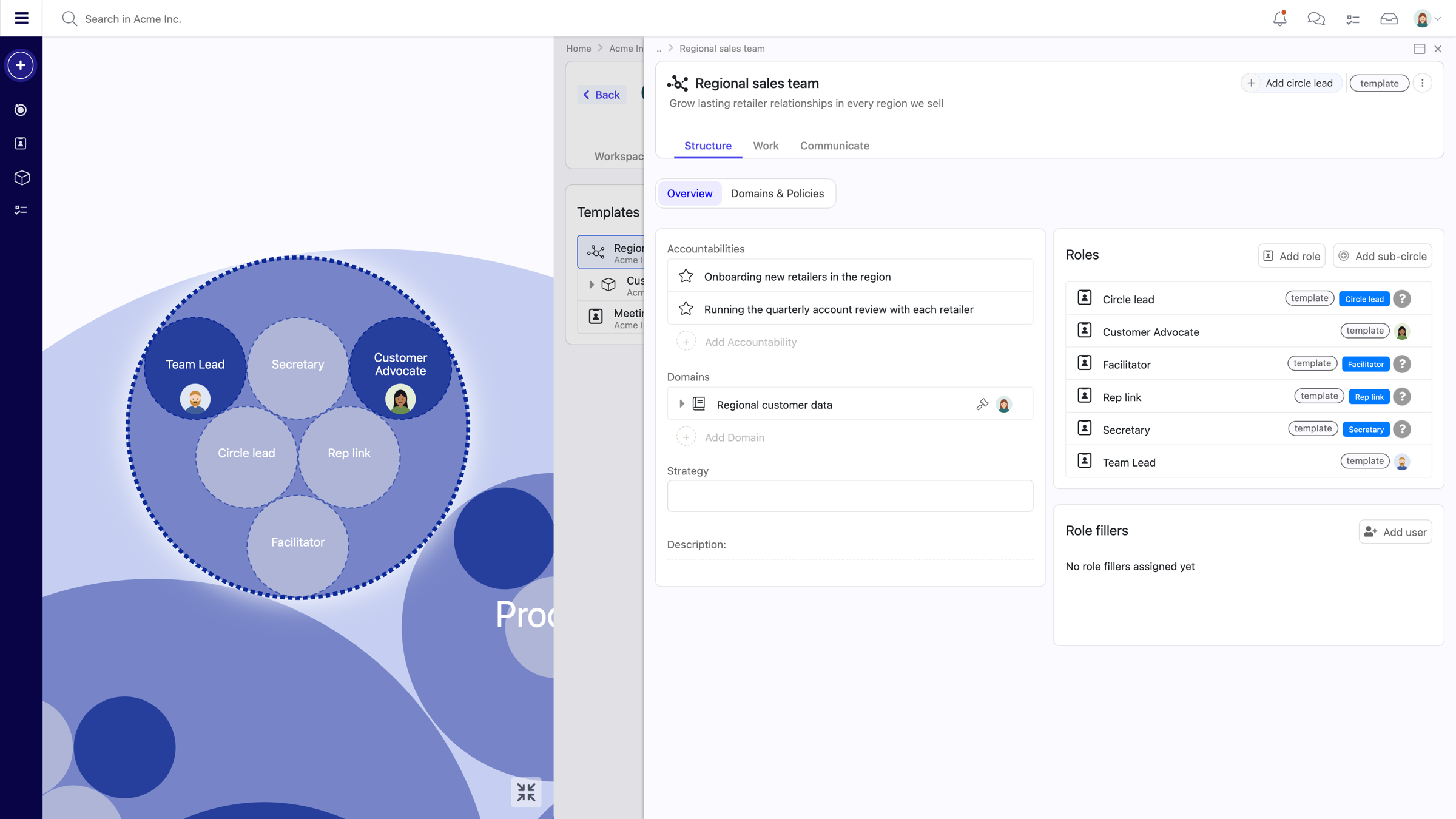
Circles, roles and projects. A circle template is a whole subtree: it can hold its own roles, sub-circles, accountabilities, domains and policies, and the projects and tasks inside them. A project template carries its tasks, so a recurring piece of work starts with the same checklist every time.
Two ways. Take something you already have, open its ... menu and choose Create template. Or start from scratch in the Templates tab of your workspace, circle or role settings. When you capture an existing circle you choose what to bring along: the structure only, the people assigned, or the comments. By default a template keeps the structure and the work, and leaves the people and the conversation behind. The templates guide walks through every option.
Every template is stored in a circle or in the workspace, and that decides where it applies: there, and in everything below it. A workspace template is available everywhere, while a template stored in the Sales circle stays within Sales and its sub-circles. Admins of a workspace, circle or role create and maintain the templates. Using one needs no admin rights at all: anyone allowed to create the circle, role or project can pick a template for it.
Create a circle, role or project the way you normally would and open the Apply template dropdown in the dialog. Pick a template and its contents are added to what you are creating, ready to adjust before you save. A template always creates something new. It never overwrites an existing circle, so a circle that has drifted can be replaced with a clean copy rather than repaired by hand.
Templates are kept apart from your organisation. They live in the Templates tab rather than among your circles and roles, and only appear in your circle map while one is open. When you open a circle template, it appears in the circle map with a dashed outline and every item in it carries a template tag, so you always know whether you are editing a blueprint or the live structure.
No. A template is a starting point, and nothing in your organisation changes until someone uses it, so creating or editing one does not go through governance proposals. That keeps templates quick to maintain without weakening how your structure evolves.
Yes. On anything created from a template, the Notify me menu has a section covering every copy of it. Follow assignments to every Team Lead in the organisation, or changes to every regional sales circle, without subscribing to each one. See notifications and email settings.
Role templates also appear in the Templates list. The roles every new circle receives automatically, such as Circle lead and Facilitator, are role templates too, configured as core roles. Circle and project templates extend the same idea from a single role to whole teams and pieces of work.
Organisations that distribute authority through roles and circles often grow by repeating what works: a new region, a new client team, a new course cohort. Templates make that growth consistent without making it rigid. Each new circle starts from the shared baseline, then evolves through its own governance like any other. Combined with custom labels and custom fields, they let you encode how your organisation works once and hand it to every team that needs it.


