
Let's get self organised
and get work done.
and get work done.
Nestr helps you get clarity and focus on purpose

Secure your workspace with enterprise-grade Single Sign-On. Nestr supports SAML 2.0 authentication, allowing your team to log in through your existing identity provider (Okta, Azure AD, Google Workspace, and more) with centralised access control.

Single Sign-On (SSO) allows your team to log in to Nestr using the same credentials they use for other corporate applications. Instead of maintaining a separate Nestr password, users authenticate via your identity provider such as Okta, Azure AD, or Google Workspace. Nestr supports the SAML 2.0 standard, the industry standard for enterprise SSO integrations.
SSO setup involves configuring a SAML application in your identity provider and entering the resulting metadata in Nestr's SSO settings. Your IT administrator will need access to both systems. Once configured, users will be redirected to your identity provider's login page when they access Nestr, and will be logged in automatically if they already have an active session.
SSO improves security and reduces friction. Users avoid password fatigue, IT administrators have centralised control over access, and offboarding an employee in your identity provider automatically removes their Nestr access. For organisations with strict security requirements, SSO also enables multi-factor authentication to be enforced at the identity provider level for all Nestr logins.
Every role in Nestr can have its own projects and todos, making work transparent across your organisation. Projects track multi-step outcomes while todos capture individual next actions.
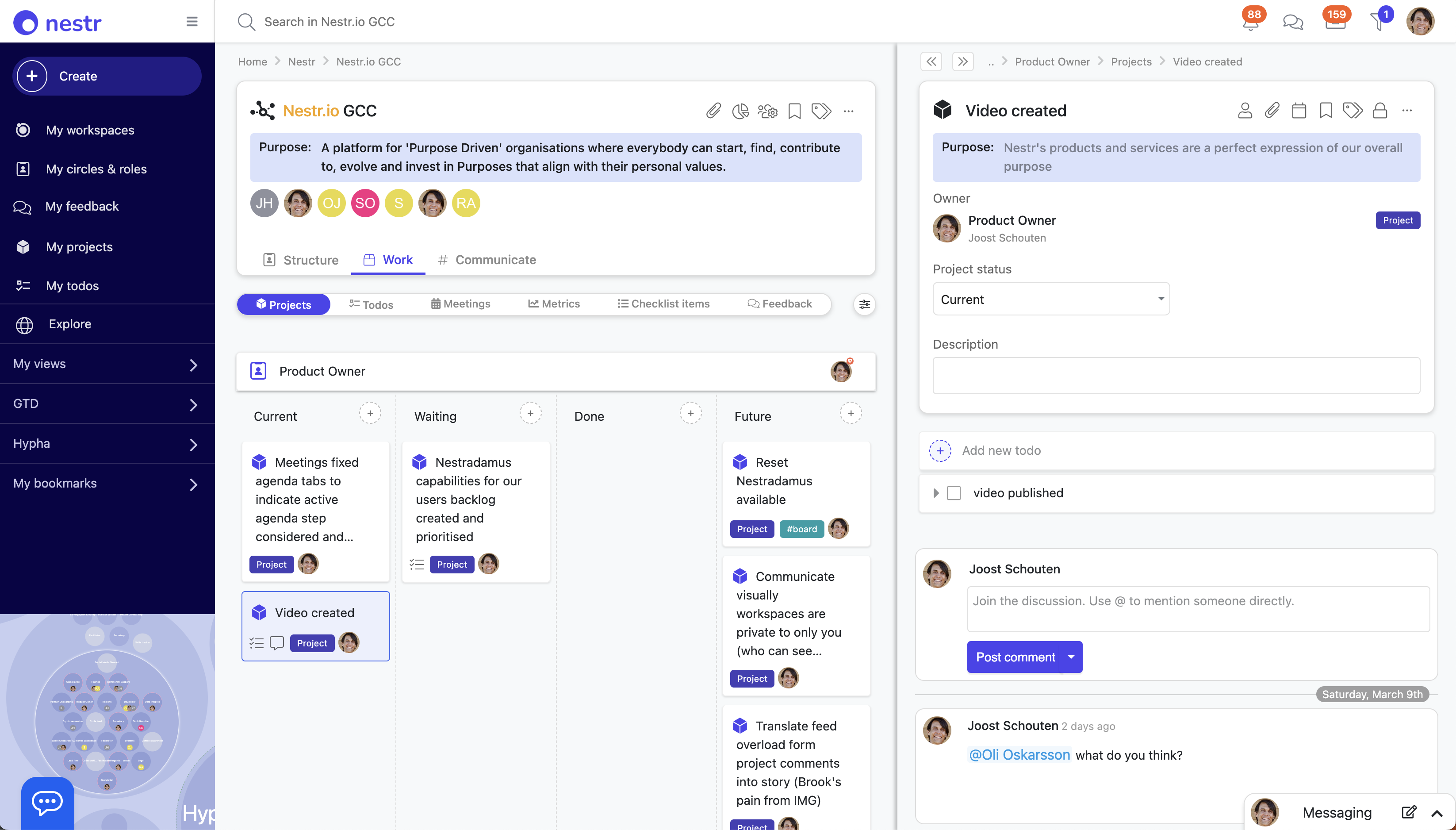
A simple Kanban board shows project status (Current, Waiting, Future, Done) for each role or circle. Nest todos inside projects, add due dates, assign collaborators, and discuss progress in comments.
This isn't just task management. It's work made visible in the context of who is accountable for it. When work lives under roles, everyone can see what's happening without asking.
Projects and todos are Nestr's task management layer, designed around role accountability rather than personal task lists. A project is a multi-step outcome owned by a role. A todo is a discrete next action. Both live within the role or circle they belong to, making it immediately clear who is responsible and why the work exists.
Each role has a Kanban board with four statuses: Current, Waiting, Future, and Done. Projects can contain nested todos, due dates, and collaborators. Team members can comment on projects to discuss progress, ask questions, or surface blockers. All of this is visible to anyone with access to the circle, creating transparency without status meetings.
In self-managing organisations, work belongs to roles, not individuals. When a role changes hands, the projects and todos travel with the role, so nothing gets lost in transition. It also makes delegation natural: assign a collaborator to a project and the accountability stays with the role holder while others can contribute.
Nestr's search goes far beyond simple text matching. Combine operators to find exactly what you need: filter by label, assignee, completion status, due date, and more, all in a single query.

Search across all your workspaces at once, or scope to a specific circle. Find all your projects, all overdue tasks, or all roles with a specific accountability, instantly.
Save any search as a view in your navigation for quick access later. This turns Nestr's search into a personal dashboard builder, letting you create the exact views you need for your workflow.
Nestr's powerful search covers the entire content of your organisation: roles, circles, projects, todos, governance records, meeting notes, and people. You can search across workspaces simultaneously or narrow results to a specific circle, making it easy to find anything regardless of where it lives in your structure.
Nestr supports a range of search operators that let you combine filters in a single query. Filter by label, assignee, completion status, due date, circle, and more. Results update instantly as you type, and you can combine multiple operators to narrow large datasets to exactly what you need.
Saved views turn one-time searches into permanent navigation shortcuts. Instead of recreating a complex query every day, save it once and access it from your sidebar. This is particularly useful for team leads who need recurring views such as all open projects in their circle, all overdue todos assigned to them, or all roles without a current member.
Migrate from other platforms or back up your organisational data without friction. Import governance structures from Holaspirit, Glassfrog, Peerdom, or CSV files, and export your complete workspace data whenever you need it.

Nestr supports direct imports from Holaspirit, GlassFrog, and Peerdom, as well as CSV-based imports for custom data structures. When you import, Nestr maps the existing roles, circles, accountabilities, policies, and domains from your source system into the equivalent Nestr structures, preserving your governance setup as accurately as possible.
Export your data from your current platform, then upload the file in Nestr's import interface. Nestr processes the file and creates the corresponding circles, roles, and governance structures in your new workspace. Review the imported structure, make any adjustments, and you're ready to go. For CSV imports, a template is provided to ensure the correct data format.
You can export a complete snapshot of your workspace at any time, including all circles, roles, accountabilities, policies, domains, projects, and governance records. Exports are available in standard formats and can be used for backups, audits, reporting, or migrating to other systems. Your data is always yours to take.
Boards give you a visual overview of work across your organisation. See projects grouped by status (Current, Waiting, Future, Done) for any role, circle, or across your entire workspace.

Switch between board and list views depending on what works best for the context. Drag and drop projects between columns to update their status, or click into any item for the full detail. Boards pull directly from your roles and circles, so there is no need to duplicate work into a separate project tool.
Boards are especially useful during tactical meetings when reviewing the state of work across a circle. At a glance, you can spot what is moving, what is stuck, and where attention is needed, making project reviews faster and more focused.
Nestr turns any list of work into a Gantt chart. Switch a circle's projects, a role's todos or a saved search to the timeline view and every item becomes a bar running from its start date to its due date, on a calendar you can drag.
It is not a separate planning tool bolted on the side. The timeline reads the same work, the same roles and the same permissions as the rest of Nestr, so the plan you are looking at is the work itself rather than a copy of it that someone has to keep up to date.
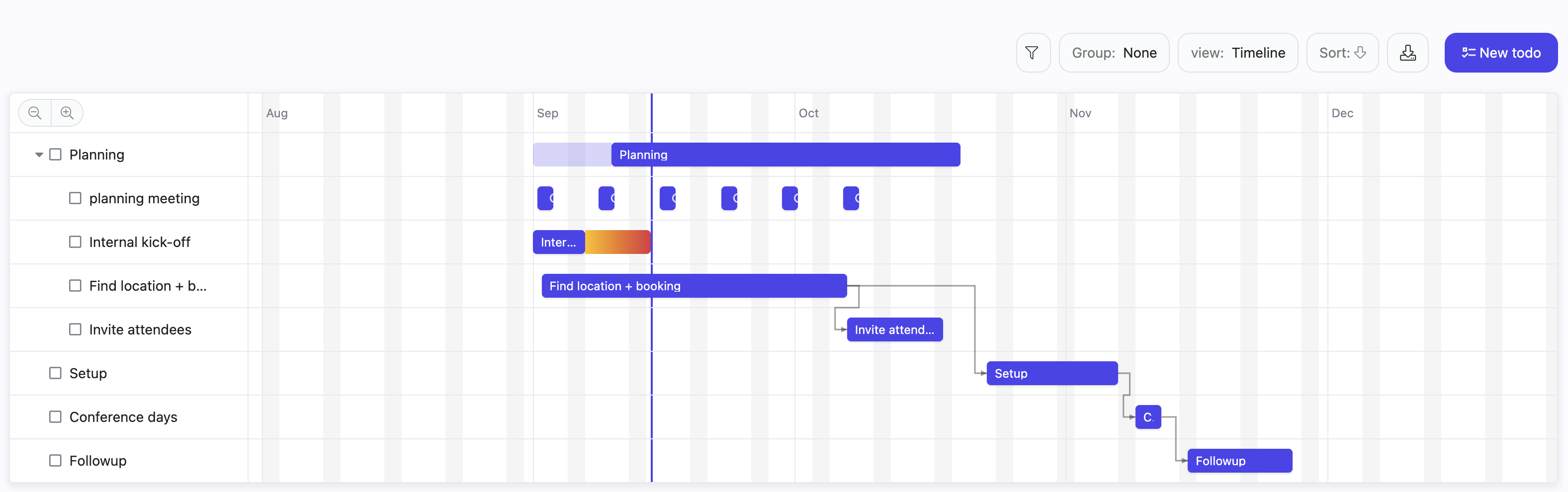
The timeline is a Gantt style view available anywhere Nestr offers a list. Each item is a bar from its start to its due date, grouped into swimlanes when the list is grouped, and zoomable from days out to quarters. Items with no dates keep their row so you can see what still needs planning, and drag them straight onto the chart to schedule them. The full walkthrough lives in the timeline view guide.
Yes. Drag a bar sideways to move a piece of work, keeping its length. Drag either end to change just that date. Drag an unscheduled item onto the chart to give it dates for the first time. Every drag writes to the item itself, so the change is immediately visible to everyone who can see that work, and the usual edit rights apply.
Yes. Drag the handle at the end of one bar onto another and the second item now waits for the first to finish. When you push something later, everything waiting on it moves along too, and so does anything waiting on that, down the chain.
Nestr follows the convention most teams expect: work is pushed later, never pulled earlier, and completed work is never moved. You can still drop a bar wherever you like. If it starts before the thing it waits for has finished, the bar and its arrow turn red to tell you so, rather than refusing the move. Circular dependencies are the one thing Nestr will not accept.
Dependencies are not confined to the chart. Any item's menu has a Dependencies entry, so you can record that one project waits for another without opening a timeline at all.
Yes. A repeating item keeps one row on the chart with a bar for each occurrence in view, rather than cluttering the plan with a row per week. Drag one and Nestr asks whether you meant that occurrence or the whole series. See recurring meetings and tasks.
A dedicated Gantt tool assigns a bar to a person and lives apart from how your organisation actually works. Nestr assigns work to the role or circle accountable for it, so the timeline shows commitments held by roles, and a bar does not become orphaned when someone changes what they do.
It is also the same work you see everywhere else. The bar on the chart is the same project that appears on the kanban board, in projects and todos, in search, and in a circle's reporting. There is no sync step and no second source of truth, which is where most Gantt charts go stale.
Yes. A view you pick from the switcher is remembered in your own browser. A view written into a search travels with that search, so a tab saved with a timeline in it opens as a timeline for everyone who opens that type of item. A circle can give itself a Roadmap tab and every member sees the same plan. See custom fields and the tabs guide for building one.
The timeline sits alongside the Scrum and Agile app, so a team can run sprints on a board and still show a quarter of epics and milestones as a chart when it needs to talk about sequencing with the rest of the organisation.
Gantt charts have a reputation, and it is mostly deserved: they are often a schedule drawn by one person and handed to everyone else. Used in a role based organisation the logic inverts. Roles hold their own dates, the chart shows how those commitments line up, and the dependencies make visible which circle is waiting on which. It becomes a shared picture a circle checks itself against, rather than a plan imposed on it.
Labels are what make Nestr come alive. By assigning a label to any nest, you give it meaning, turning it into a role, circle, project, or anything your organisation needs.

Labels define what a nest is: a role, a circle, a project, a goal, or any concept your organisation uses. You can create personal labels visible only to you, or workspace labels shared with your team. Labels are the foundation of Nestr's flexibility, letting every organisation define its own structure and vocabulary.
Every label you create is searchable and filterable. A well-designed labelling system becomes the foundation for powerful custom dashboards and workflows. Filter by label to see all projects, all roles in a circle, or all items with a specific status at a glance.
Build custom integrations and automate workflows with Nestr's comprehensive REST API. Access your workspace data programmatically, create custom dashboards, sync with external tools, and build bespoke solutions tailored to your organisation's needs.

Nestr's REST API gives developers programmatic access to workspace data: roles, circles, projects, todos, people, governance records, and more. Use it to build custom dashboards, synchronise Nestr data with external tools, automate repetitive operations, or create integrations that connect Nestr to the rest of your organisation's software stack.
API access is available on Pro and higher plans. Generate an API token from your workspace settings and use it to authenticate requests against Nestr's REST endpoints. The API follows standard REST conventions, returning JSON responses that are straightforward to parse and integrate.
Common integrations include syncing role data with HR systems, pulling project status into custom reporting tools, triggering automations in third-party platforms based on Nestr events, and building internal dashboards that combine Nestr data with other business tools. Teams also use the API to migrate data in bulk and build onboarding automations.
Sometimes you need a private conversation. Nestr's direct messaging lets you reach any colleague instantly for one-on-one discussions that do not belong in a circle feed.

Access your messages from anywhere in Nestr via the messaging tab. Search for colleagues, start conversations, and get notified when they respond. Direct messages are private between you and the recipient, separate from all circle feeds and project discussions.
While transparency is a core principle of self-organisation, not every conversation belongs in a circle feed. Use direct messaging for sensitive topics, personal feedback, or quick one-on-one coordination that does not need to be visible to the whole circle.
Every item in Nestr can be extended with custom fields to capture exactly the data your organisation needs. Add text fields, numbers, dates, dropdowns, checkboxes, or file uploads to any label type.
Custom fields are defined at the label level. When you create a project label with a priority dropdown, every project in your workspace gets that field automatically. This keeps your data consistent and searchable across the board. You can add as many fields as needed, and each one is available in search and views.
Use custom fields to track anything from sprint numbers and cost centres to client references and approval status. They turn Nestr's flexible structure into a data model that matches your organisation's specific way of working.
Keep sensitive work confidential with private projects, meetings, todos, and notes. Control visibility at a granular level so that personal development plans, confidential initiatives, and private reflections stay between the people who need access.

Nestr supports privacy controls on individual projects, meetings, todos, and notes. A private item is visible only to the people explicitly given access. This enables a range of use cases: sensitive HR processes, board-level discussions, confidential partnerships, personal development plans, and any other work that should not be visible to the full circle or organisation.
Nestr is built on the principle of role-based transparency: all governance, roles, and accountabilities are visible by default. Privacy controls apply to operational work within roles, not to the roles themselves. This means your organisation's structure remains open while specific work items can be kept confidential where necessary.
The person who creates a private item controls who can access it. They can add specific collaborators, who will see the item in their workspace. Access can be updated at any time, keeping sensitive work within a defined group without requiring administrator involvement for every change.
Connect AI assistants directly to your Nestr workspace through the Model Context Protocol (MCP). AI agents can read your governance structure, create and process tensions, manage work, and act from roles, making powerful agentic workflows possible within your self-organised team.
MCP is an open standard that lets AI assistants connect directly to external tools and data sources. When connected to Nestr, an AI agent can read your full organisational structure, understand who holds which role, and take actions within the boundaries of those roles.
Once connected, your AI assistant has access to Nestr's full functionality through natural language. It can query roles and circles, create tensions, manage projects, process governance proposals, and update work items. The agent acts within the governance boundaries you have defined, keeping its behaviour accountable and traceable in the audit trail.
MCP brings outside assistants in. Connectors do the reverse, giving Nestr's own AI colleagues governed access out to the systems your organisation already runs on: Gmail and Outlook, Google Drive and OneDrive, Slack and Teams, GitHub, GitLab, Jira and Confluence, Linear, Notion, Asana, Monday.com, ClickUp, Sentry, Stripe, Xero, QuickBooks, Moneybird, HubSpot, Intercom, Dropbox, Box, Zapier and Make. You can register a custom connector against any API or MCP server you run yourself, including internal systems.
Access is a governance decision rather than a shared password. Admins decide which data sources exist and how broadly they may be owned; whoever may edit a role's domain decides which roles get them. Credentials are held in an external vault, never travel to the agent, and every use is recorded against the role that made it.
Nestr structures your organisation around roles and circles rather than traditional job titles and departments. Each role has a clear purpose, accountabilities, and domains, so everyone knows what's expected and where authority lives.

A role is a defined unit of work with three core components: a purpose (why it exists), accountabilities (ongoing activities the role is responsible for), and domains (areas it has exclusive control over). People fill roles rather than holding job titles, and one person can fill multiple roles across different circles simultaneously.
Circles are self-governing teams that contain roles and can nest within each other, creating a flexible hierarchy that mirrors how work actually flows. Each circle has its own purpose, governance meetings, and communication space. Circles can be as large or small as the work requires, and they support Holacracy, Sociocracy, Teal, and custom governance models.
Authority is distributed through roles rather than centralised in managers, so decisions happen close to the work. As your organisation evolves, roles and circles can be updated through governance proposals, keeping your structure alive and responsive. Visualise your entire structure with Nestr's interactive org map.
Check out our guide on how to get started with roles and circles.
Evolve your organisation's structure through transparent, asynchronous governance proposals. Any role filler can propose changes to roles, circles, accountabilities, domains, and policies, without waiting for a meeting.

A governance proposal is a formal request to change your organisational structure: creating a new role, updating accountabilities, removing a policy, or restructuring a circle. Proposals follow a structured consent process so every voice is heard while governance keeps moving forward.
Submit a proposal with a clear description of the change and why it addresses a tension. Circle members review it, raise objections if they have them, and you integrate feedback until the proposal passes or is withdrawn. The entire process is documented and transparent to all circle members.
Governance proposals let your organisation evolve continuously without waiting for a scheduled meeting. For teams with distributed time zones or fast-moving work, asynchronous proposals mean structural decisions never get bottlenecked by calendar availability.
Circle (or Tactical) meetings in Nestr provide a structured space for operational coordination. Team members share updates on projects, surface blockers, and request support, all within a focused, time-boxed format.

A tactical meeting is a regular, structured operational check-in for a circle. It follows a fixed agenda to keep meetings efficient: check-in, checklist review, metrics review, project updates, and tension processing. This structure ensures nothing falls through the cracks while keeping the meeting time-boxed and purposeful.
Nestr guides your facilitator through each agenda item. Circle members review their checklists, update their metrics, share project statuses, and raise tensions that need addressing. Tensions raised during the meeting lead directly to next actions, projects, or requests, turning conversation into concrete progress.
Because your projects, checklists, and metrics all live in Nestr, the meeting agenda is pre-populated automatically. No preparation overhead, no copy-pasting from other tools. Everything is in context, and outcomes are captured directly in the system where the work happens.
Governance meetings are where your organisation's structure evolves. In a dedicated, facilitated session, circle members review and process proposals to create, change, or remove roles, accountabilities, domains, and policies.

Nestr supports multiple governance frameworks out of the box:
Nestr guides your facilitator through the full governance meeting flow: opening round, agenda building from tensions, proposal presentation, clarifying questions, reactions, objections, and integration. Each step keeps the group focused and moving forward.
Unlike tactical meetings (which focus on operational work), governance meetings are about working ON the organisation, not IN it. The decisions made here shape how authority is distributed and how your team collaborates going forward.
Every decision made in a governance meeting is automatically recorded and applied to your organisational structure. Roles, accountabilities, and policies update in real time, no manual maintenance required. Combined with governance playback, you get a complete history of how and why your organisation evolved.
The Insights app analyses your organisation's patterns to surface areas for improvement. It looks at governance health, meeting cadence, role coverage, and work distribution to identify blind spots. View the data over time, across your organisation and visualised as a heatmap on your organisational structure.

Insights tracks 40+ metrics across your workspace: governance activity, meeting frequency, tension volume, role coverage, work distribution, and how well your team finishes what it starts. Data is visualised over time and as a heatmap overlaid on your org structure, making it easy to spot where energy is flowing and where it is not.
Are some circles overloaded while others are idle? Are governance records outdated? Are meetings happening regularly? Is work evenly distributed? Insights answers these questions with data rather than guesswork, helping facilitators and leaders direct their coaching where it will have the most impact.
All insights are fully accessible to AI agents via Nestr's MCP integration. Your AI agents can analyse organisational health data and surface recommendations directly within your workspace.
Track the numbers that matter to each circle and role. Nestr's metrics feature lets you define KPIs at any level of your organisation and review them during tactical meetings.
Metrics are quantifiable indicators owned by a specific role. Each metric has a name, a target, and a current value that the role holder updates regularly. During tactical meetings, metrics are reviewed as part of the standard agenda, so performance data is always visible and current.
Because each metric is owned by a specific role, accountability is clear. There is no ambiguity about who is responsible for a number. Regular updates keep the data fresh and visible to the whole circle, making performance review a natural part of operational rhythm rather than a separate reporting exercise.
Each circle in Nestr has its own communication feed, keeping conversations focused and relevant. No more wading through company-wide noise to find what matters to your team.

A Circle Feed is the dedicated communication space for a circle. It aggregates discussions from within the circle, including conversations happening inside projects and roles, so nothing gets missed. Members can also create topic channels within their circle for further organisation.
Traditional company chat tools create a flat list of channels that quickly becomes overwhelming. Nestr's circle-scoped feeds mirror how self-organising teams actually work: information flows within and between circles, following your organisational structure rather than fighting against it. The right people see the right conversations by default.
Share your organisational structure with the world by publishing it as an interactive org chart. Stakeholders, partners, and potential hires can explore your roles, circles, and accountabilities without needing a Nestr account.

The Published Org Chart is a public, read-only view of your organisational structure that anyone can access via a link, without needing a Nestr login. It shows your circles, roles, who fills them, and what each role is accountable for, giving full transparency into how your organisation distributes authority.
The published view updates automatically as your governance evolves. Every role change, circle update, or accountability revision made through governance proposals or meetings is reflected immediately. There is no manual diagram maintenance required.
For purpose-driven organisations that want to demonstrate their commitment to distributed authority and clear accountability, the published org chart is a practical way to show how decisions get made. It builds trust with stakeholders, helps potential hires understand the culture, and makes onboarding faster for new team members.
Every action, decision, and structural change in Nestr is automatically recorded with full context: who did it, when, from which role, and why. No manual logging required.

The Audit Trail captures every action taken in Nestr: governance decisions, role changes, project updates, tension submissions, meeting outcomes, and user activity. Each entry includes who performed the action, from which role, and when. This gives your organisation a complete, timestamped institutional memory.
For teams deploying AI agents, the audit trail becomes especially valuable. Every agent action is captured in the same system as human work, giving you the traceability that regulators and stakeholders increasingly expect from agentic systems. You can see exactly what an AI agent did, in which role, and when.
During reviews, compliance audits, or incident investigations, you can trace any decision back to its source. For new team members, the audit trail explains why the current structure looks the way it does. For leaders, it surfaces patterns in how work and governance evolve.
Governance Playback lets you replay how your organisational structure has evolved over time. See exactly what changed, when, and why, from role creation to accountability updates to policy changes.
Governance Playback gives you a timeline of every structural change your organisation has made: new roles created, accountabilities added or removed, circles restructured, policies introduced or revoked. You can scrub through your org history and see the structure as it existed at any point in time.
Organisations that practice distributed governance make hundreds of structural decisions over time. Without a record, institutional memory lives only in people's heads and gets lost when team members leave. Governance Playback preserves the reasoning and evolution behind your current structure, so new members can understand why things are the way they are.
Nestr's OKR app helps your organisation align around what matters most. Set Objectives at the workspace, circle, or role level, then define measurable Key Results that track progress toward those goals.
OKRs (Objectives and Key Results) are a goal-setting framework. An Objective is an ambitious, qualitative goal. Key Results are specific, measurable outcomes that define what achieving that goal looks like. In Nestr, OKRs are embedded in your circle structure so goals stay connected to the roles and teams responsible for them.
OKRs in Nestr live in your circle structure, creating a clear line of sight from individual contributions to organisational purpose. Objectives nest, so a workspace or circle objective can carry contributing objectives assigned to the circles and roles beneath it, keeping the link between the ambition and the teams doing the work explicit. Progress stays honest because it is measured by the key results defined against each objective rather than rolled up from an average of averages. Regular check-ins and progress tracking keep goals visible and actionable rather than buried in a spreadsheet nobody updates.
In self-organising teams, there is no manager to provide performance reviews. Nestr's feedback app fills this gap with structured peer-to-peer feedback tied to specific roles.

Give feedback to a colleague in a specific role, because someone might excel as a Developer but need growth as a Facilitator. Role-based feedback keeps things specific and actionable rather than vague and personal. Feedback can be kept private between giver and receiver, or made public for full transparency.
In a self-organising team, a person fills multiple roles with different accountabilities. Generic feedback about a person misses this nuance. Role-based feedback in Nestr ensures that the feedback is relevant to the specific work, making it more useful for growth and more fair in assessment.
Nestr includes a built-in Scrum and Agile app that brings sprints, a backlog, and burndown charts to any team. Switch it on for a circle and its work board becomes a sprint board, with story points, epics, milestones, and a burndown that updates itself as stories close. There is nothing to install and no separate tool to sync.
Because every user story is also a regular Nestr project, sprint work stays connected to roles, accountabilities, and reporting across the rest of the workspace. You assign that work to roles, not just to individuals, so Scrum runs inside your organisation, not beside it.
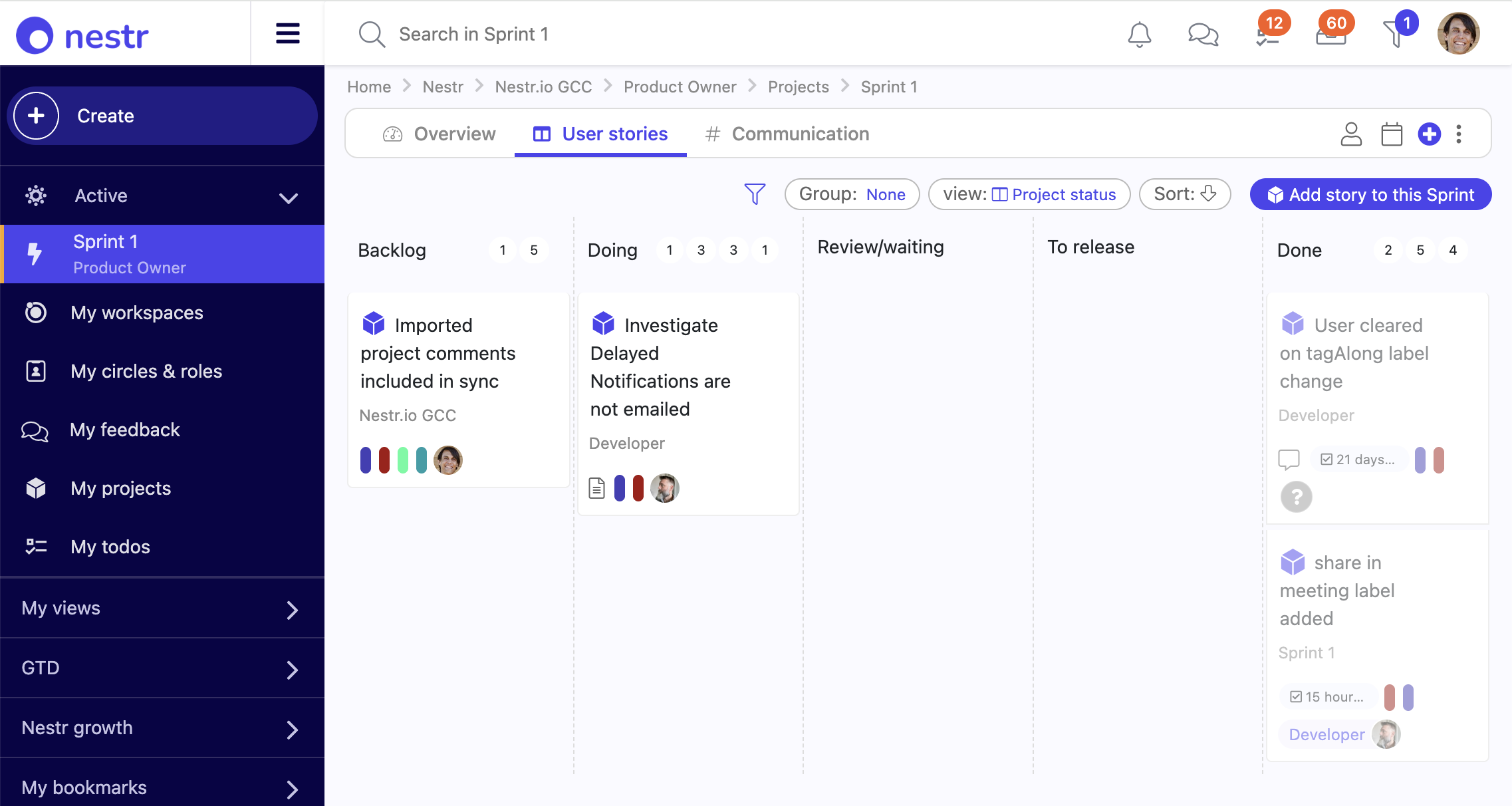
The Scrum and Agile app is a per-team toggle that adds agile project management to a circle. It adds three ways to group work, sprints, epics, and milestones, plus a user story work item with Fibonacci story points and a burn slider. Once enabled, the circle's Projects tab becomes a kanban sprint board grouped by sprint, with the backlog pinned to the side. Turn it on for one team or many, and leave the rest of the organisation on plain projects. The full walkthrough lives in the Scrum and Agile app guide.
A sprint is a time-boxed iteration with a start and end date, a sprint goal, and a points capacity. Drag a story from the backlog onto a sprint to schedule it, then move it across the To do, In progress, In review, and Done columns as work advances. It is the same kanban board Nestr uses everywhere, so the team learns it once. Every story also carries the standard project status, so it shows up in projects and todos, search, and reporting like any other work.
Standalone Scrum tools assign a story to an individual. Nestr assigns work to the role or circle accountable for it, and the people who fill that role are the ones who deliver it. A dedicated Scrum tool cannot do this, because it has no model of your roles and circles. You staff a sprint, an epic, or a milestone through the roles in your circle, so the team doing the work is the team your organisation already says is responsible.
Group the sprint board by role to see at a glance who owns what. Because one person can fill several roles, their sprint work across all of those roles rolls up in one place. And when a role changes hands, its stories and sprint commitments travel with the role, so nothing is orphaned when someone moves on or takes leave.
Epics and milestones group stories above the sprint. An epic is a scope axis, a feature or initiative that runs across several sprints, with its own Proposed, In progress, and Done status. A milestone is a time-boxed delivery target such as a release, version, or phase, with a term and a Released or Cancelled outcome. Open either one to see its stories grouped by sprint, so a whole initiative or release reads on a single screen.
Every sprint, epic, and milestone carries an automatic burndown. Total points sum from the stories linked to it, and points burned sum from each story's burn slider. Mark a story Done and its points burn in full, or slide it to show partial progress without changing status. The chart plots remaining points over time as a line, with a gauge view one click away. Paired with metrics and KPI tracking, a team gets a live read on delivery without a status meeting.
Yes. Sprint, epic, and milestone are labels, so you can rename them per workspace to match how your team talks, for example Sprint to Iteration or Milestone to Release. The new name flows through the buttons, the board, and the story fields. You can also add your own fields to a user story, extend the board with extra status columns, or switch off a grouping you do not use. None of it needs engineering.
Scrum is additive. A team running sprints keeps its roles and circles, meetings, policies, and notes, and gains agile planning on top. Nothing is siloed in a separate app: the sprint board and the organisation chart are the same system, so a story estimated on Monday shows up in workspace reporting the same day.
The Insights app analyses your organisation's patterns to surface areas for improvement. It looks at governance health, meeting cadence, role coverage, and work distribution to identify blind spots. View the data over time, across your organisation and visualised as a heatmap on your organisational structure.
Insights tracks 40+ metrics across your workspace: governance activity, meeting frequency, tension volume, role coverage, work distribution, and how well your team finishes what it starts. Data is visualised over time and as a heatmap overlaid on your org structure, making it easy to spot where energy is flowing and where it is not.
Are some circles overloaded while others are idle? Are governance records outdated? Are meetings happening regularly? Is work evenly distributed? Insights answers these questions with data rather than guesswork, helping facilitators and leaders direct their coaching where it will have the most impact.
All insights are fully accessible to AI agents via Nestr's MCP integration. Your AI agents can analyse organisational health data and surface recommendations directly within your workspace.
Self-organising teams distribute authority through roles and circles. Nestr’s rights management lets your permission model do the same thing. Define what every member can read, create, update, and delete through named profiles, and attach those profiles to people directly or to the roles they fill. Anyone stepping into a role picks the rights up. Anyone stepping out loses them. Authority follows the work, not the person.

Most tools offer two settings: everyone-can-do-everything, or admin-only. Self-organising teams need more nuance than that. The Finance circle needs to see budget items their colleagues should not. A Project Lead role needs to assign people to its projects without being a full circle admin. Auditors need to read but not change. Read-only stakeholders need a view that costs less than full access.
Rights management gives you these distinctions without bolting a separate access-control system onto your workspace. Permissions become part of governance, written in the same vocabulary as roles, circles, and labels.
Most self-organisation tools treat access as a fixed tier: member, admin, owner. That works until you need anything more nuanced than “trust them with everything or nothing”. Nestr is in a class of its own here: a full permission profile editor that lets you shape role-based access control to match how your organisation actually works.
Three layers stack to produce what each member can do for any given item:
Role bleed is what happens when a person or an AI agent acts beyond the purpose of their role simply because nothing technical stops them. With humans the consequences are usually slow and visible. With AI agents the same drift can happen in a single session, at machine speed. The role definition said “do A” but the system still allowed A, B, and C, so the agent did all three.
Rights management is the enforcement layer that closes the gap. Roles set the lane through their purpose, accountabilities, and domains. Rights management is what makes those boundaries technical instead of aspirational. The model maps directly onto two industry-standard concepts:
Combined with permission creep prevention and the broader practice of agent governance, rights management gives you “cannot, by construction” instead of “we asked it nicely”.
When AI agents fill roles in your organisation, their access should be managed in the same place as the humans they work with, not in a parallel system. Rights management ties an agent’s permissions to the role it is filling. Update the role’s rights field and every agent (or human) in the role picks up the change. Unassign the agent and the rights are revoked the same way. The model satisfies the role-scoping requirements that EU AI Act and other emerging frameworks expect, without forcing you to maintain a separate access-control stack alongside Nestr.
Rights management is part of the Pro plan. It is the right fit for organisations that need to express access control in role terms: regulated industries, teams preparing for AI agent deployment, larger workspaces with mixed-permission stakeholders, and any group that wants permission boundaries to evolve as their structure does.
Nestradamus is your AI-powered organisational companion built into Nestr. It helps you navigate governance, process tensions, draft proposals, and find information across your workspace, making self-organisation more accessible for everyone on your team.
Nestradamus understands your full organisational context: your circles, roles, governance history, projects, and tensions. Ask it questions, request help drafting a governance proposal, process a tension you have been sitting on, or find information buried deep in your structure. Every response is grounded in your specific organisation, not generic advice.
General AI assistants give generic answers. Nestradamus is connected to your live Nestr workspace, so it knows your circle structure, your current roles, your open tensions, and your governance history. It acts as an expert guide to your specific organisation.
Nestradamus assists a person rather than filling a role, which means it acts as you, with exactly your access. If you cannot see a circle or edit a project, neither can it while helping you. That is what makes it safe to give an assistant to everyone in the organisation rather than to admins alone.
Beyond your Nestr data, Nestradamus can work with the systems your organisation runs on through connectors: mail, calendars, documents, code, tickets, CRM and accounting. It can also set them up for you. Ask it to connect a tool for a role and it will find the right template, register the connector, bind it and hand you the link to sign in with, all within the permissions you already hold.
Automate user lifecycle management with SCIM provisioning. Automatically create, update, and deactivate user accounts in Nestr when changes happen in your identity provider, removing the need for manual onboarding and offboarding.

SCIM (System for Cross-domain Identity Management) is an open standard for automating user account management between an identity provider and a connected application. When SCIM is configured between your identity provider and Nestr, user accounts are created, updated, and deactivated automatically. Adding a new employee in Okta or Azure AD immediately creates their Nestr account, and removing them deactivates it.
Nestr's SCIM implementation is compatible with any identity provider that supports the SCIM 2.0 standard, including Okta, Azure Active Directory, Google Workspace, and OneLogin. Setup involves generating a SCIM endpoint URL and token in Nestr and entering these in your identity provider's application configuration.
Manual user management creates security risks: offboarded employees may retain access longer than intended, and new employees may wait before gaining the access they need. SCIM eliminates both problems by making Nestr user provisioning a direct consequence of your authoritative identity system, reducing both administrative burden and access risk.
Secure your workspace with enterprise-grade Single Sign-On. Nestr supports SAML 2.0 authentication, allowing your team to log in through your existing identity provider (Okta, Azure AD, Google Workspace, and more) with centralised access control.
Single Sign-On (SSO) allows your team to log in to Nestr using the same credentials they use for other corporate applications. Instead of maintaining a separate Nestr password, users authenticate via your identity provider such as Okta, Azure AD, or Google Workspace. Nestr supports the SAML 2.0 standard, the industry standard for enterprise SSO integrations.
SSO setup involves configuring a SAML application in your identity provider and entering the resulting metadata in Nestr's SSO settings. Your IT administrator will need access to both systems. Once configured, users will be redirected to your identity provider's login page when they access Nestr, and will be logged in automatically if they already have an active session.
SSO improves security and reduces friction. Users avoid password fatigue, IT administrators have centralised control over access, and offboarding an employee in your identity provider automatically removes their Nestr access. For organisations with strict security requirements, SSO also enables multi-factor authentication to be enforced at the identity provider level for all Nestr logins.
Governance Playback lets you replay how your organisational structure has evolved over time. See exactly what changed, when, and why, from role creation to accountability updates to policy changes.
Governance Playback gives you a timeline of every structural change your organisation has made: new roles created, accountabilities added or removed, circles restructured, policies introduced or revoked. You can scrub through your org history and see the structure as it existed at any point in time.
Organisations that practice distributed governance make hundreds of structural decisions over time. Without a record, institutional memory lives only in people's heads and gets lost when team members leave. Governance Playback preserves the reasoning and evolution behind your current structure, so new members can understand why things are the way they are.

Sure! You can test out Webflow on our free plan where you can experiment with 2 projects. Your unhosted projects will have a two-page limit, but you can purchase a site plan on a per-project basis to unlock up to 100 static pages and additional CMS pages.
Sure! You can test out Webflow on our free plan where you can experiment with 2 projects. Your unhosted projects will have a two-page limit, but you can purchase a site plan on a per-project basis to unlock up to 100 static pages and additional CMS pages.
Sure! You can test out Webflow on our free plan where you can experiment with 2 projects. Your unhosted projects will have a two-page limit, but you can purchase a site plan on a per-project basis to unlock up to 100 static pages and additional CMS pages.
Sure! You can test out Webflow on our free plan where you can experiment with 2 projects. Your unhosted projects will have a two-page limit, but you can purchase a site plan on a per-project basis to unlock up to 100 static pages and additional CMS pages.
Sure! You can test out Webflow on our free plan where you can experiment with 2 projects. Your unhosted projects will have a two-page limit, but you can purchase a site plan on a per-project basis to unlock up to 100 static pages and additional CMS pages.
Sure! You can test out Webflow on our free plan where you can experiment with 2 projects. Your unhosted projects will have a two-page limit, but you can purchase a site plan on a per-project basis to unlock up to 100 static pages and additional CMS pages.
Sure! You can test out Webflow on our free plan where you can experiment with 2 projects. Your unhosted projects will have a two-page limit, but you can purchase a site plan on a per-project basis to unlock up to 100 static pages and additional CMS pages.


.png)


