Nestr turns any list of work into a Gantt chart. Switch a circle's projects, a role's todos or a saved search to the timeline view and every item becomes a bar running from its start date to its due date, on a calendar you can drag.
It is not a separate planning tool bolted on the side. The timeline reads the same work, the same roles and the same permissions as the rest of Nestr, so the plan you are looking at is the work itself rather than a copy of it that someone has to keep up to date.
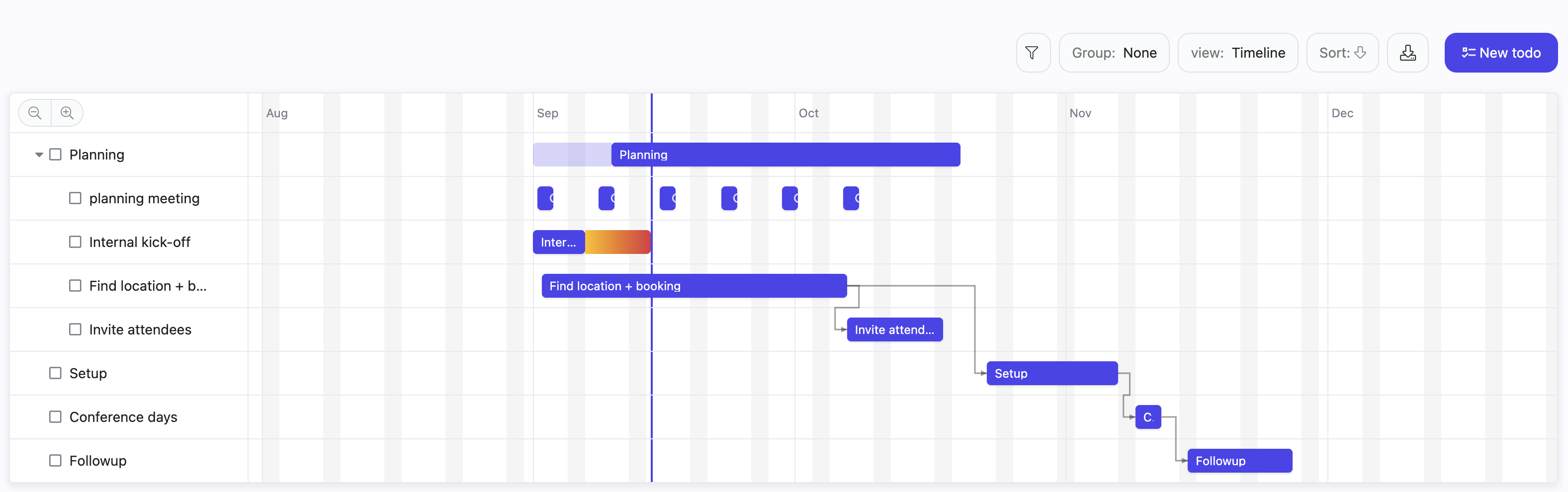
The timeline is a Gantt style view available anywhere Nestr offers a list. Each item is a bar from its start to its due date, grouped into swimlanes when the list is grouped, and zoomable from days out to quarters. Items with no dates keep their row so you can see what still needs planning, and drag them straight onto the chart to schedule them. The full walkthrough lives in the timeline view guide.
Yes. Drag a bar sideways to move a piece of work, keeping its length. Drag either end to change just that date. Drag an unscheduled item onto the chart to give it dates for the first time. Every drag writes to the item itself, so the change is immediately visible to everyone who can see that work, and the usual edit rights apply.
Yes. Drag the handle at the end of one bar onto another and the second item now waits for the first to finish. When you push something later, everything waiting on it moves along too, and so does anything waiting on that, down the chain.
Nestr follows the convention most teams expect: work is pushed later, never pulled earlier, and completed work is never moved. You can still drop a bar wherever you like. If it starts before the thing it waits for has finished, the bar and its arrow turn red to tell you so, rather than refusing the move. Circular dependencies are the one thing Nestr will not accept.
Dependencies are not confined to the chart. Any item's menu has a Dependencies entry, so you can record that one project waits for another without opening a timeline at all.
Yes. A repeating item keeps one row on the chart with a bar for each occurrence in view, rather than cluttering the plan with a row per week. Drag one and Nestr asks whether you meant that occurrence or the whole series. See recurring meetings and tasks.
A dedicated Gantt tool assigns a bar to a person and lives apart from how your organisation actually works. Nestr assigns work to the role or circle accountable for it, so the timeline shows commitments held by roles, and a bar does not become orphaned when someone changes what they do.
It is also the same work you see everywhere else. The bar on the chart is the same project that appears on the kanban board, in projects and todos, in search, and in a circle's reporting. There is no sync step and no second source of truth, which is where most Gantt charts go stale.
Yes. A view you pick from the switcher is remembered in your own browser. A view written into a search travels with that search, so a tab saved with a timeline in it opens as a timeline for everyone who opens that type of item. A circle can give itself a Roadmap tab and every member sees the same plan. See custom fields and the tabs guide for building one.
The timeline sits alongside the Scrum and Agile app, so a team can run sprints on a board and still show a quarter of epics and milestones as a chart when it needs to talk about sequencing with the rest of the organisation.
Gantt charts have a reputation, and it is mostly deserved: they are often a schedule drawn by one person and handed to everyone else. Used in a role based organisation the logic inverts. Roles hold their own dates, the chart shows how those commitments line up, and the dependencies make visible which circle is waiting on which. It becomes a shared picture a circle checks itself against, rather than a plan imposed on it.


.png)


