
Plenty of work comes back on a rhythm. A weekly tactical meeting, a monthly governance meeting, a quarterly review, a report due every Friday, a licence to renew each year. In Nestr you set that up once as a repeat, and the work turns up when it is due instead of being copied out by hand.
Anything with a date can repeat: a meeting, a project, a todo, or an item on a label you defined yourself.
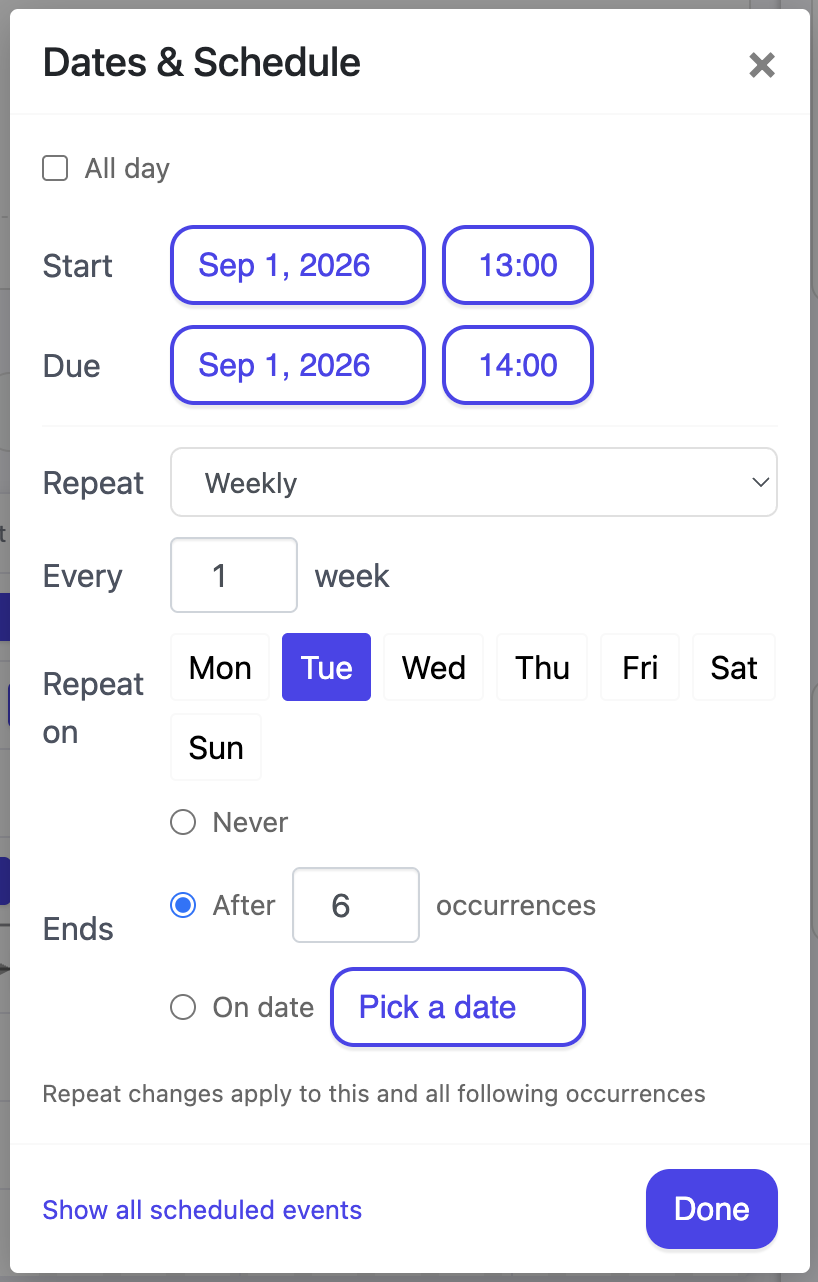
Repeat lives in the same place as the dates. Open the item, click the date chip, and the Dates & Schedule panel opens with start, due, all day and repeat together.
A repeating item carries a repeat icon on its date chip, and the chip's tooltip says what the rule does in words, so you can check a rule without opening it.
Choose Custom repeat rule to write the rule directly, using the standard calendar format that Google Calendar, Outlook and Apple Calendar all share. That covers patterns the simple options do not, such as the last Friday of every month. Nestr keeps a custom rule exactly as you wrote it and will not quietly rewrite it when you reopen the editor.
A rule expands in the time zone you set it in, so every Tuesday at 09:00 stays at 09:00 through daylight saving changes rather than drifting by an hour. All day items have no time to shift and simply land on the day.
Nestr does not make a pile of copies when you set a repeat. The item holds the rule, and Nestr keeps the next occurrence ready as a real item, so your lists show the one that is coming rather than fifty that are not. As each occurrence passes, the next one appears.
This matters when you search. A recurring todo shows up once in My todos, not once per week for the next year.
If a run of occurrences comes and goes with nobody completing them, commenting on them, rescheduling them or holding the meeting, Nestr stops creating new ones. This keeps an abandoned weekly meeting from quietly filling a workspace with items nobody ever opens. The series is not deleted and the rule is not changed. Touch any occurrence and it picks up again from the next one due.
So if a recurring item has stopped appearing, it is usually this rather than a broken rule. Open the series, complete or reschedule the current occurrence, and it resumes.
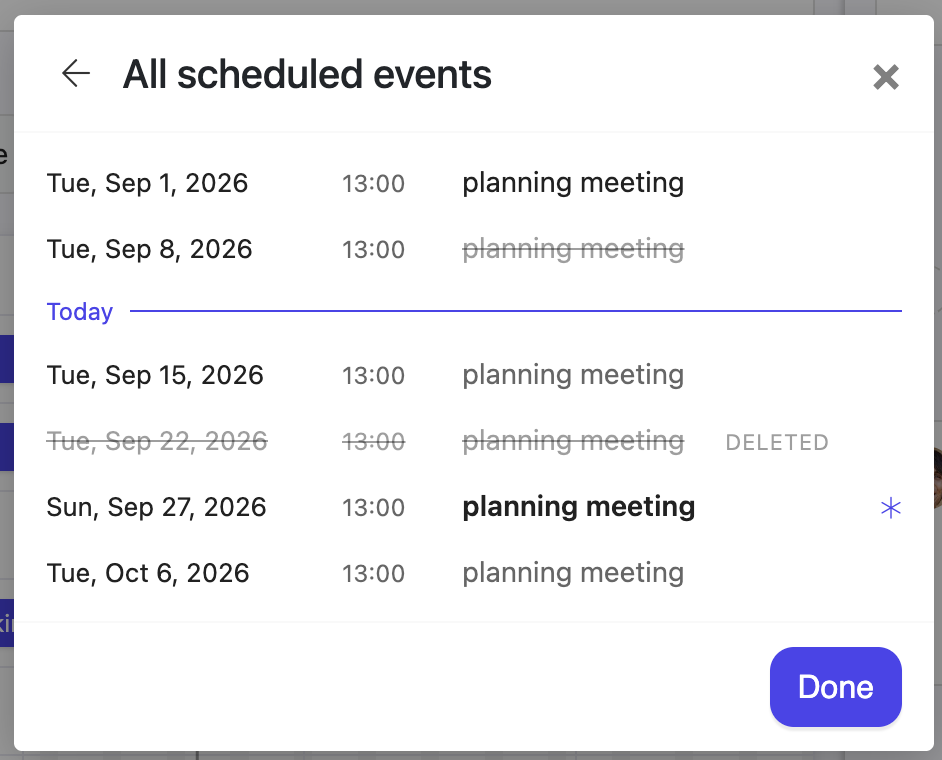
Click the date chip's repeat marker, or the Show all scheduled events link, to open the full list of occurrences for a series: what has already happened above, what is coming below. Occurrences you have changed are marked This occurrence has changes, so an edited one is easy to spot among the rest.
This is the part worth understanding, because it is where recurring work in every tool trips people up. When you move or delete something that repeats, Nestr asks what you meant.
Changing the repeat rule is always a forward looking edit. Nestr says so on the editor: Repeat changes apply to this and all following occurrences. History is left alone. A meeting that ran weekly for six months and then moved to fortnightly keeps six months of weekly meetings in its record, which is what you want when you go back to read the minutes.
Delete a single occurrence and it is taken out of the series rather than ending it. It stays on the occurrence list struck through, marked This occurrence was removed from the series, and Restore occurrence puts it back. Cancelling one week of a standing meeting is a one click action, and a reversible one.
Ending a whole series is a bigger step, so it asks for delete rights on the item. See Rights management, and Recovering deleted items if you removed something you wanted.
Recurring meetings are the most common use of this in Nestr, because most circles run a tactical meeting on a weekly rhythm and a governance meeting on a monthly one. Schedule the meeting once, set it to repeat, and the next one is always there for people to add agenda items to before it starts.
Agenda items, attendance and minutes belong to the occurrence they happened in, so each week's meeting keeps its own record. See Running meetings in Nestr.
On a timeline a series keeps a single row, with one bar per occurrence in view. Dragging one of those bars asks the same question: this occurrence, or the entire series.
The date operators in search work on recurring items the same way they work on anything else. due:this_month finds what is due this month, occurrences included, and sort:due orders it. See Nestr search.
A recurring checklist of a different kind also exists in Nestr: the checklist a circle reads through in its tactical meeting, for habits that are checked rather than scheduled. See Running meetings in Nestr for those.


.png)


