
The Scrum and Agile app turns any circle in your workspace into a lightweight agile team. You get a backlog, a sprint kanban, epics and milestones that group stories above the sprint, and a burndown chart that updates itself as stories close out. Nothing else about your circle changes, so you can keep meetings, metrics, and projects running alongside.
This guide walks through enabling the app, what changes on the circle, how user stories, sprints, epics, and milestones fit together, the burndown mechanics, and how to customise the app for your team's process.
Two switches need to be on for Scrum to show up: one at the workspace level and one on each circle that should run sprints.
This unlocks the Scrum labels (user story, sprint, epic, milestone) for the whole workspace and reveals the per-circle opt-in on every circle. The card also lists the circles that already have Scrum enabled and carries the Sprint, Epic, and Milestone feature toggles for the workspace.

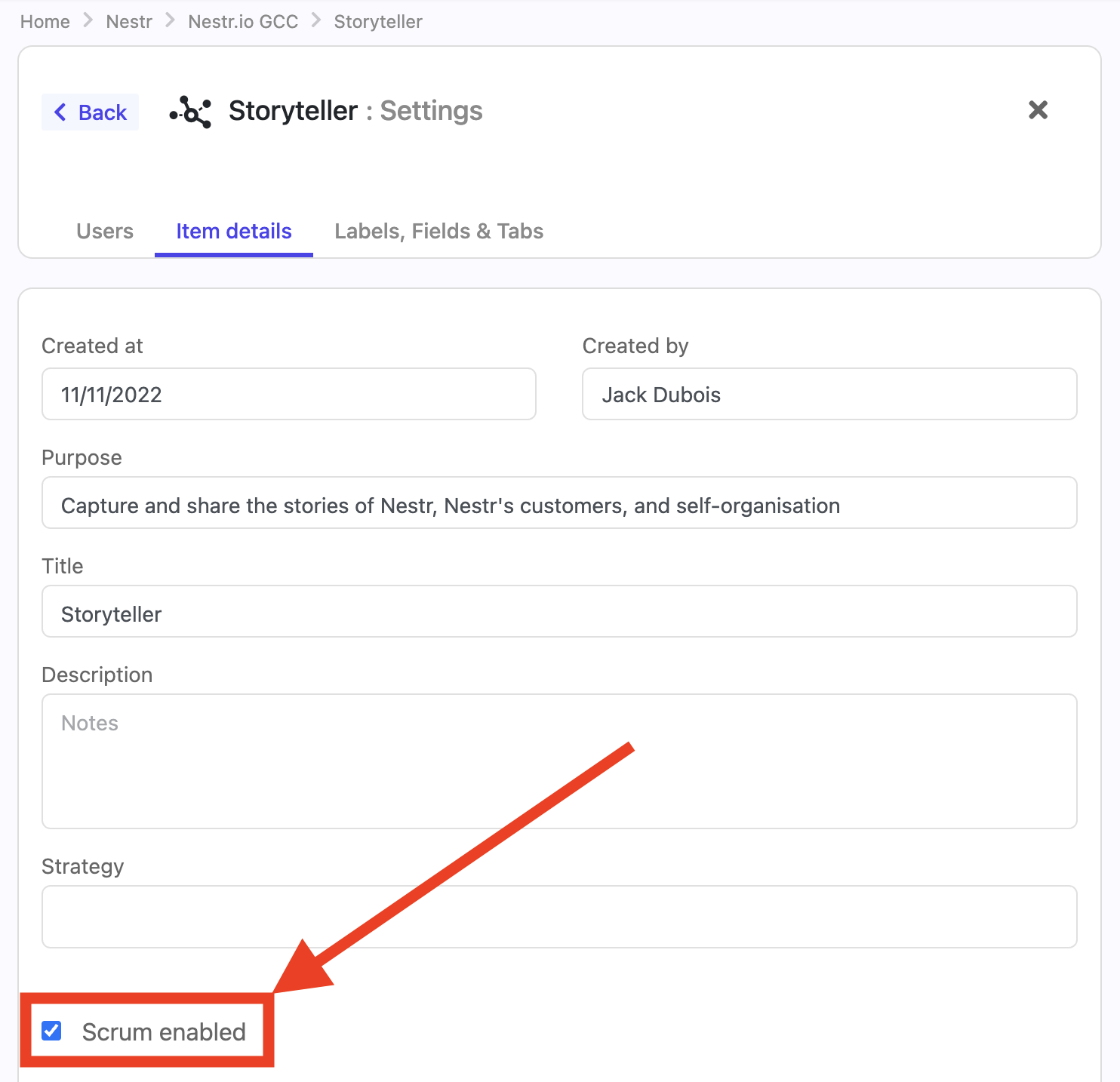
Scrum is opt-in per circle so that only the teams that run sprints get the extra behaviour. It is off for every circle until you switch it on, so a design circle and a product circle in the same workspace can both run their own sprints without interfering, while finance stays on plain projects. There are two ways to enable a circle.
From the app card. Under Circles with Scrum enabled on the Scrum / Agile card, click Edit and tick the circles that should run Scrum. This is the quickest way to switch several circles on at once.
From the circle.
Either way, the circle's Projects tab updates as soon as Scrum is enabled.
When a circle has Scrum enabled, its existing Projects tab becomes the Scrum board. There is no separate Scrum tab group: keeping everything on the Projects tab means a Sprint, an Epic, and a regular project (a user story not yet in a sprint) all coexist in the same place.
Three things change on the Projects tab:

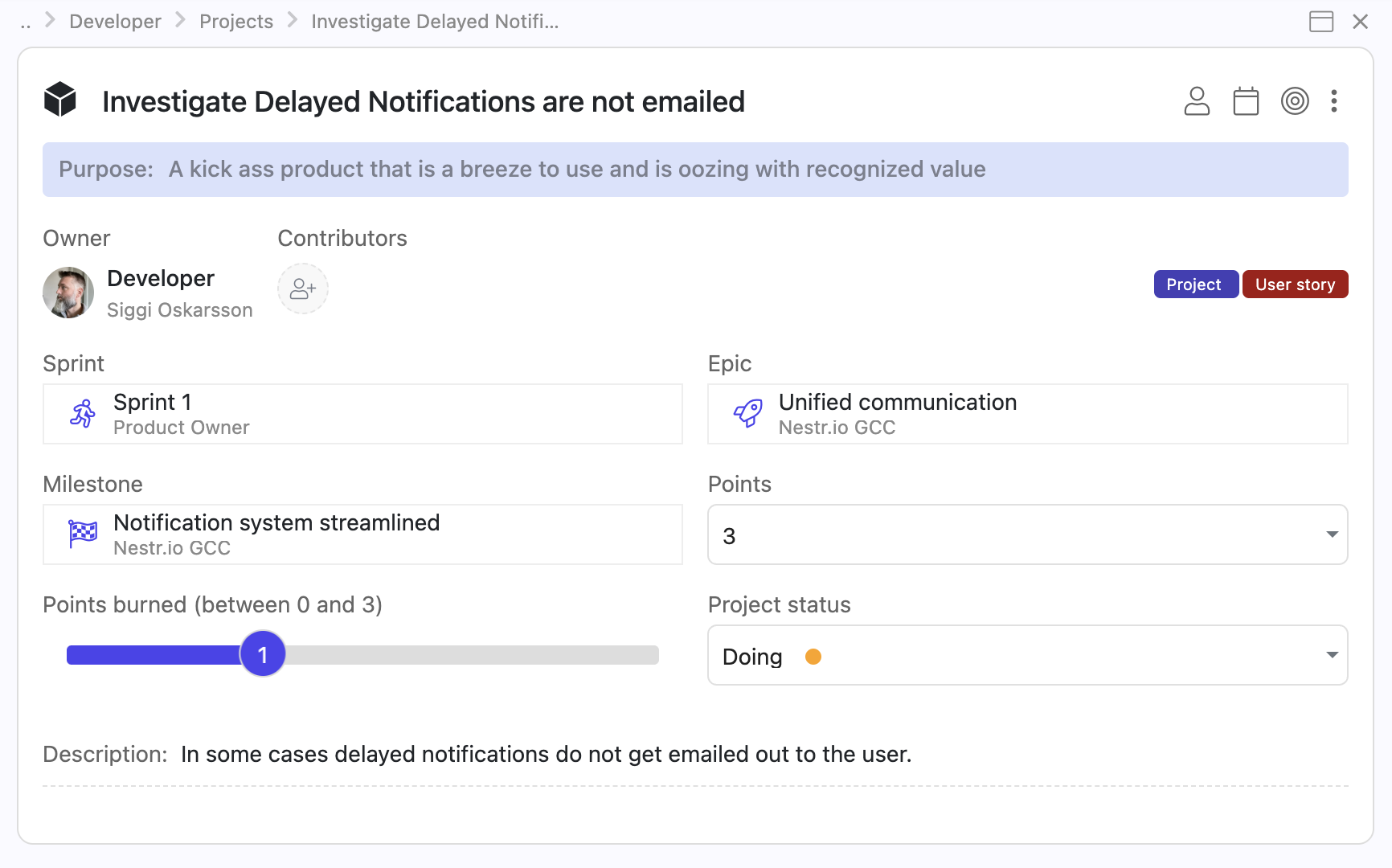
A user story is the unit of Scrum work. Each story carries:
Stories also carry the standard project status field (Future, Current, Waiting, Done) which is what drives the sprint kanban columns and the burndown.
There is no dedicated story type field in this version. To flag a story as a bug, add the global bug label to it. If your team wants a fuller set of types, add a select field to the user story label (see Add custom fields on the Scrum labels below) with whatever options you use.
The user story label also adds the project label, so every story is also a regular project. It shows up in the rest of Nestr's project surfaces (workspace search, project reports, the role's Projects tab) the same way any other project does, and todos can hang off it as usual.
The role or circle the story belongs to is the team that owns the work. Pick it during creation in the same way you pick a parent for a regular project.
A sprint is a time-boxed iteration. It carries:
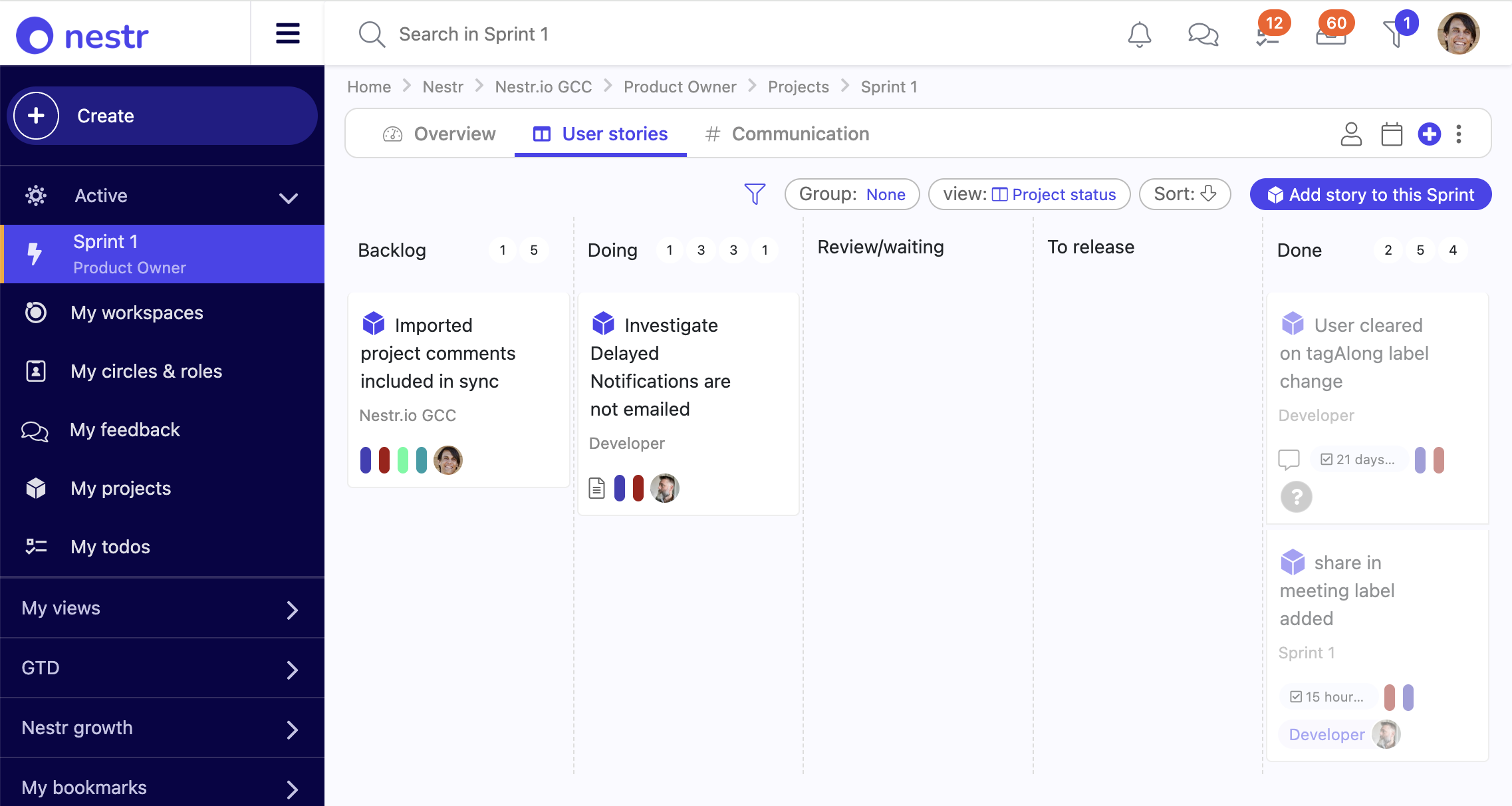
Sprints surface in two places: as columns on the circle's Projects tab when grouped by Sprint, and as their own items you can open for the full board and details.
Open a sprint to see two tabs:
The dedicated sprint kanban. Stories assigned to this sprint group into four columns by their project status:
Drag a story from one column to the next to advance it. The kanban view sorts stories within a column by manual order, so you can also reorder by dragging up and down within a column.
Aggregates comments from the sprint itself plus every story linked to it via the Sprint field. All sprint-related conversations sit in one stream, and you can post a sprint-level comment directly here too. This is the place to track sprint-wide discussion without losing the per-story threads.
Three fields drive the chart, two of them computed:
Each story has its own Points burned slider. Two things drive it:
The chart defaults to a line view. A toggle on the chart switches to a gauge if you want a single completion ratio instead.

Sprints are not user-completable in this version. The term and the burndown tell the team where they stand; there is no "tick the box to close" step. If a sprint passes its end date without all stories in Done, it shows as overdue (red badge on the list view card, picked up by overdue filters and search) so the team gets a nudge.
An epic is a scope axis: a feature or initiative that lives longer than a single sprint. Each epic carries:
Open an epic to see its Stories tab. Stories belonging to this epic group by sprint, with a Backlog group for stories that have no sprint yet. The sprint groups are ordered by their start date, so the nearest active sprint comes first.
That layout is the whole point of epics: a single screen shows the work for this initiative that already shipped, the work that lands in the next sprint, the work that comes after that, and the work still in the backlog. Update the epic status as the initiative progresses so anyone scanning the epic list sees what is moving.
An epic also has a Communication tab that aggregates comments from the epic itself plus every linked story, the same way sprints do.
A milestone is a time-boxed delivery target that sits above the sprint: a release, a version, or a phase that groups user stories across several sprints. Where an epic tracks a feature by scope, a milestone tracks a ship date. Each milestone carries:
Open a milestone to see its Stories tab, where stories group by sprint with a Backlog group for stories not yet in a sprint. That gives you one screen showing how a release breaks down across its sprints. A milestone also has a Communication tab that aggregates comments from the milestone and every linked story, the same as sprints and epics.
Set a story's Milestone field to roll it up, and group the circle's Projects tab by Milestone to see the whole release at a glance.
Scrum stories are also projects. They carry the project label in addition to user story (the user story label adds project automatically), which means:
The same applies to circles: a Scrum-enabled circle still has Roles, Domains, Policies, Meetings, Metrics, Todos, and Notes if you have those apps on. Scrum is additive.
Different teams run different flavours of Scrum. A few customisation patterns cover most of what teams need, all from workspace settings, no custom labels or engineering required.
Not every team says "sprint", "epic", and "milestone". You do not need a custom label for that: rename the built-in one. On the Scrum / Agile card in workspace settings, each work type (Sprint, Epic, Milestone) has a Customize link that opens that label for editing, where you can rename it and add fields. The new name then flows everywhere the label appears: the Add buttons, the Group by options, the field titles on a user story, and the empty-state copy. Common renames are Sprint to Iteration or Cycle, Epic to Initiative or Theme, and Milestone to Release, Version, or Phase.
So if your team groups sprints under a higher delivery target it calls a "Release", rename the Milestone label to Release and use it as is. Its status, term, points roll-up, and burndown all come with it.

Sprints, epics, and milestones are each toggled on that same Scrum / Agile card. A team that plans in sprints but never groups them into releases can switch milestones off: the Add button, the Group by option, and the Milestone field on a story all disappear for that workspace. All three are on by default.
The sprint board groups by the workspace's project status field. The default field has four options (Future, Current, Waiting, Done) which map to four columns. To add columns, add options to the project status select field in the workspace's Labels & Fields settings.
Common extensions:
The user story, sprint, epic, and milestone labels accept custom fields the same way any Nestr label does. Common additions:
Can a story belong to more than one sprint?
No. A story sits in zero or one sprint. To carry unfinished work into the next sprint, change the story's Sprint field to the new sprint.
What happens to the burndown when a sprint passes its end date?
The chart keeps plotting against the original term. Past the end date, the sprint flips to overdue on the list view. Reopening completed stories or adding new ones after the end date still updates total and burned, so the chart stays accurate.
Where does the burn slider live?
On each individual user story, directly below the Points field. The sprint's Points burned is a sum of those per-story sliders, computed automatically, not a slider you drag yourself.
Why doesn't the burned points field move when I drag a story onto Done?
It should. Flipping a story's status to Done snaps the story's own Points burned slider to its full point value, which the sprint's sum picks up immediately. If the story has no points, there is nothing to add, so check the story's Points field first.
Can I disable Scrum on a circle without losing the data?
Yes. Untick Scrum enabled on the circle. The Projects tab reverts to its standard form but the sprints, stories, epics, and milestones stay in the database. Tick the box again to bring the Scrum behaviour back with everything intact.
How do I see all work across a release or milestone?
Use the built-in Milestone relationship. Set each story's Milestone field, then either open the milestone for its Stories tab (grouped by sprint) or group the circle's Projects tab by Milestone. If your team calls it something else, rename the Milestone label (see Customising) and it works the same way.


.png)


