Files & attachments in Nestr

Nestr allows you to attach files and documents to various items throughout your workspace, keeping information connected to the work it relates to.

Where you can upload files

Files can be attached to:

  • Projects — attach documents, spreadsheets, or images related to a project.
  • Meeting agenda items — attach supporting material for discussion.
  • Roles and circles — attach reference documents, guidelines, or policies.
  • Notes — embed files within rich text notes.
  • Comments — attach files to conversation threads.

How to upload a file

  1. Open the item you want to attach a file to (project, agenda item, role, etc.).
  2. Drag the file onto the project, agenda item, role etc. and drop.
  3. The file uploads and appears as an attachment.
Simply drag your files onto any item in Nestr and it will be attached.

You can also use the context menu to attach files which will open your file explorer.
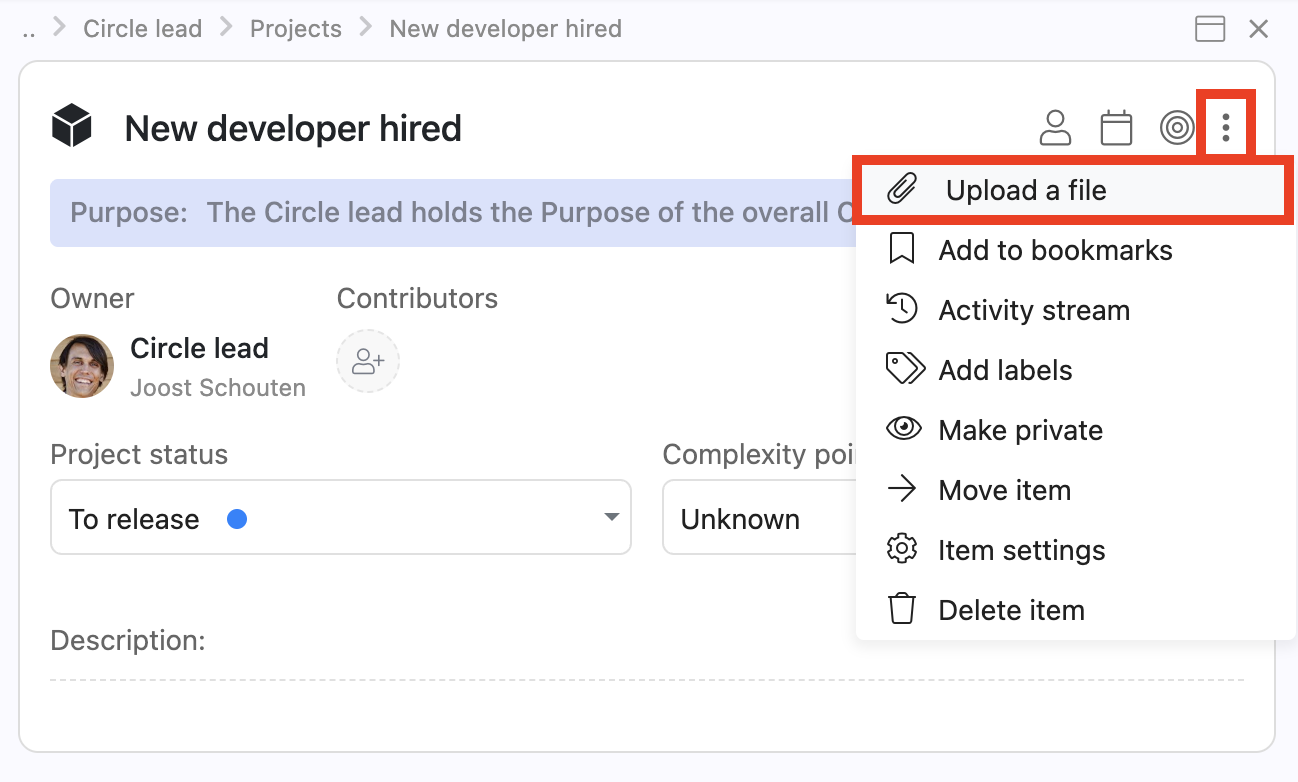
From the item context menu you can select 'Upload a file'

Viewing uploaded files

Uploaded files appear as clickable icons. Depending on the file type:

  • Images display inline as previews.
  • PDFs can often be previewed in the browser.
  • Other file types download when clicked.
Attachments show up on your item directly and can be downloaded/viewed by clicking them.

Linking to external documents

For documents stored in external systems (SharePoint, Google Drive, Notion, etc.), you can paste links directly into descriptions, comments, or notes. The link will be clickable for anyone with access to the external document.

Tip: Use a consistent approach for your team — either upload files directly to Nestr for centralised storage, or link to external documents for single-source-of-truth workflows.

File size and types

Nestr supports common file types including documents (PDF, DOCX, XLSX), images (PNG, JPG, GIF), and presentations (PPTX). There are file size limits per upload — for very large files, consider linking to an external storage service instead.